
Everyday movement & comfort

A Workstation That Works for You

Small adjustments. More room to move.

Set up your workspace around your body and your tasks. These practical starting points can help you explore a more comfortable setup—without trying to hold one “perfect” posture all day.

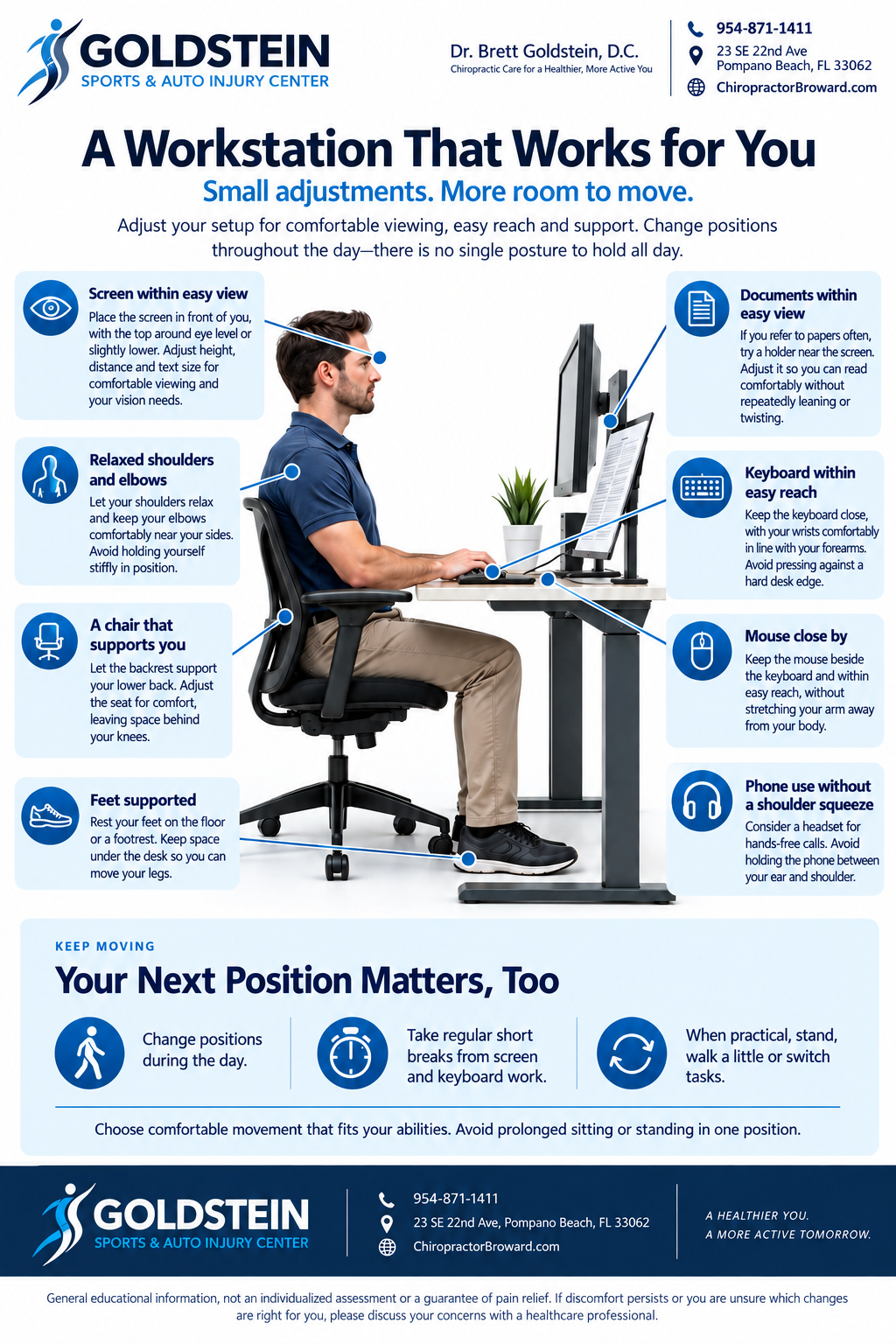
Ergonomic workstation guide showing comfortable screen, chair, keyboard, mouse, foot and document positioning with movement reminders.
View Full Ergonomic Guide Opens the full-size image in a new tab. Zoom in to read the callouts.

Start with your surroundings

Three Places to Adjust

Screen within easy view

Place the monitor in front of you, with the top around eye level or slightly lower. Start roughly an arm’s length away and adjust the distance and text size so you can read without leaning forward. Your vision needs may call for a different height.

A chair that supports you

Adjust the seat so your feet rest on the floor or a footrest. Let the backrest support your lower back, leave space behind your knees, and keep the area under the desk clear.

Keyboard and mouse within reach

Keep both close enough that your elbows can stay near your sides and your shoulders feel relaxed. Aim for comfortable, fairly straight wrists rather than reaching or resting against a hard desk edge.

Comfort includes movement

Your Next Position Matters, Too

Even a thoughtfully arranged desk is not a reason to stay still. Change positions during the day and take regular short breaks from screen and keyboard work.

When practical, stand, walk a little, or switch to a different task. If you use an adjustable desk, vary sitting and standing rather than replacing prolonged sitting with prolonged standing.

Use comfortable movement that fits your abilities. There is no need to lock yourself into one posture or force a position that feels uncomfortable.

Beyond the desktop

Laptops, Phones & Tablets

Make longer laptop sessions adjustable

A laptop’s attached screen and keyboard limit how independently you can position them. For longer sessions, consider a raised screen or separate monitor with an external keyboard and mouse. Keep the controls within easy reach.

Bring smaller screens into comfortable view

Try supporting a phone or tablet on a stand and adjust its position rather than spending a long stretch looking down at your lap. Rest your arms comfortably and change tasks or positions regularly. Avoid wedging a phone between your ear and shoulder.

A quick pause

Your Workstation Self-Check

Look for one useful adjustment, then see how it feels. This is a starting point, not a posture test.

  • Can I read the screen without leaning or lifting my chin?
  • Are my back and feet supported comfortably?
  • Can I reach the keyboard and mouse with relaxed shoulders?
  • Is there room to shift my legs and change position?
  • Can I build a short movement break into my next task?

A related resource

Movement Beyond Your Desk

Workstation setup and exercise serve different purposes. Explore the posture exercise library as a companion resource, following the guidance provided for your individual needs.

Explore Posture Exercises

About This Guide

General educational information, not an individualized assessment or a guarantee of pain relief. If discomfort persists or you are unsure which changes suit you, discuss your concerns with a healthcare professional.

Resources: OSHA Computer Workstations, monitor placement, workstation evaluation checklist and HSE display screen guidance.

Questions about your next step?

Talk with the Office

Call 954-871-1411 to discuss your concerns and appointment availability.

Online scheduling coming soon.

Email the Office for general questions. Please do not send sensitive medical information through ordinary email.